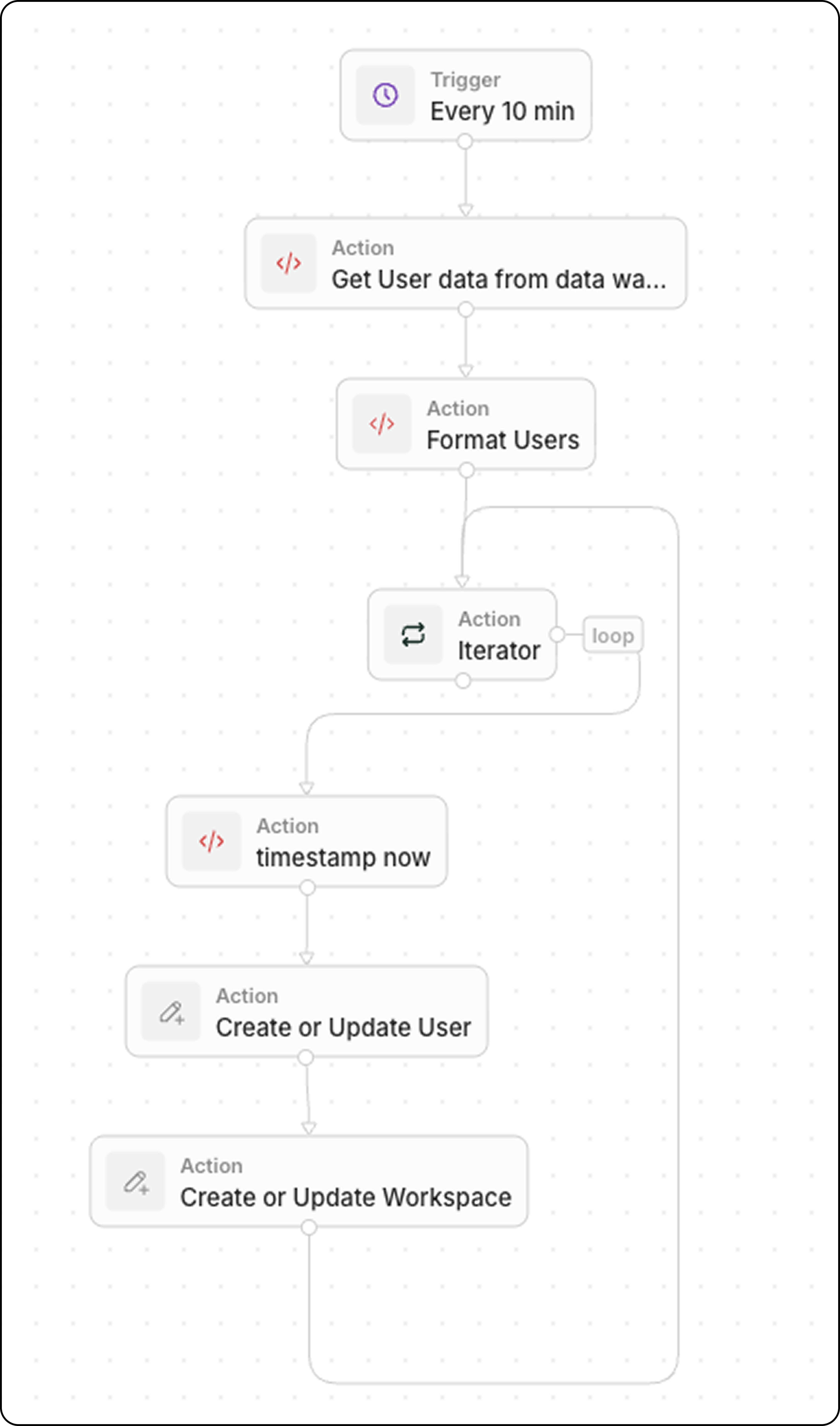
Use this pattern to keep Diex in sync with product data from your data warehouse (e.g., Snowflake, BigQuery, PostgreSQL).
Workflow Structure
Trigger : On a ScheduleCode : Query your data warehouseCode (optional): Format data as arrayIterator : Loop through each productUpsert Record : Create or update in Diex
Step 1: Schedule the Trigger Set the workflow to run at a frequency matching your data freshness needs:
Every 5 minutes for near real-time sync
Every hour for less critical data
Daily for batch updates
Step 2: Query Your Data Warehouse Add a Code action to fetch recent data:
Filter by updated_at >= last X minutes to retrieve only recently changed records. This keeps the sync efficient.
If your warehouse returns data in a format that needs transformation, add another Code action. Common transformations include type conversions, field renaming, and data cleanup.
Example: User Data with Boolean and Status Fields Example: Product Data with Type Conversions Step 4: Iterate Through Products Add an Iterator action:
This loops through each product in the array.
Step 5: Upsert Each Record Inside the iterator, add an Upsert Record action:
Use Upsert (update or create) instead of building separate branches for create vs. update. It’s faster to build and easier to debug.
Example Use Cases